

Kelvin Perez
Back

Support inbox triage

A controlled support workflow that turns Gmail requests into HubSpot tickets, unsent reply drafts and urgent Slack alerts, with a person in control of sending.

Support inbox triage, original project capture

Walkthrough

01

The problem

Billing questions, bug reports, sales inquiries, and spam compete in the same shared inbox, delaying useful responses.

02

My role

I implemented the Gmail intake, category and urgency review, HubSpot ticket lifecycle, draft protection, urgent Slack alerts and PostgreSQL recovery records.

03

The approach

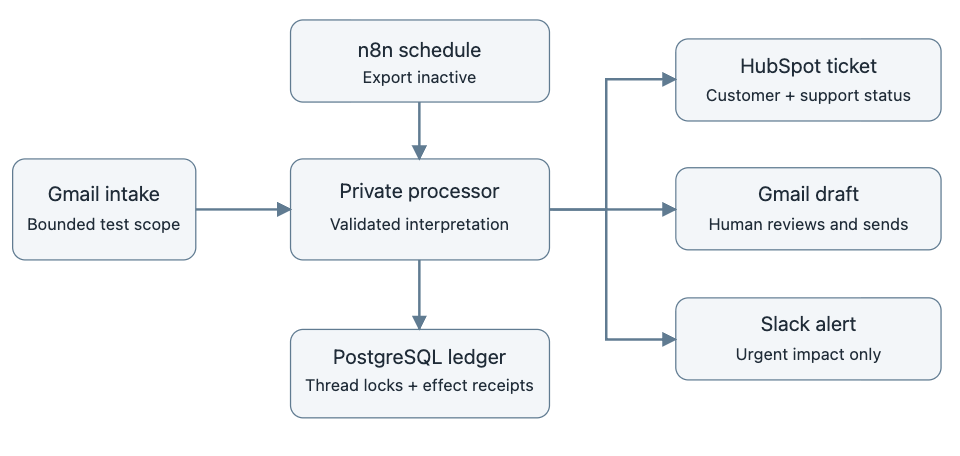
Gmail owns conversations and human sending. HubSpot owns tickets. Self-hosted n8n invokes a private TypeScript processor, while PostgreSQL records per-message effects and serializes conversations.

  • Keep sending under human control; automation saves drafts only.
  • Reuse the conversation ticket on follow-up and preserve reviewer-edited drafts.
  • Record each effect separately so replay can avoid duplicating completed work.

04

The solution

The processor classifies synthetic support requests, associates HubSpot tickets with contacts, saves replies in the original Gmail thread and confirms Slack alerts for urgent cases. Follow-up handling reuses and reopens the existing ticket while preserving a reviewer-edited draft.

05

Results & impact

Three connected synthetic requests produced associated HubSpot tickets and unsent Gmail drafts; the urgent case confirmed a Slack alert. A controlled follow-up reused and reopened its ticket without changing the reviewer-edited draft. No automated customer email was sent.

06

Lessons & takeaways

Preserve ownership and human review across the connected workflow. Measure each outcome separately and retain the limits of the controlled evidence.

07

Explore the evidence

Three requests, inspected in the connected systems.

Controlled Gmail messages produced HubSpot tickets and unsent replies in the original threads. Only the urgent case confirmed a Slack alert.

Connected test outcomes
Request Review priority Ticket Reply draft Urgent alert
technical issue urgent Associated Unsent, correct thread Confirmed
billing normal Associated Unsent, correct thread No alert confirmed
needs review needs review Associated Unsent, correct thread No alert confirmed

Follow-up preserves the reviewer's work.

A separate connected follow-up reused and reopened the existing ticket, added the new message reference and preserved a reviewer-edited draft. Replay ingested no duplicate request. Automatic sending remained at zero.

Readback Recovery Evaluation

A request stays connected to its conversation

The controlled build connects Gmail conversations to HubSpot tickets, saved reply drafts and urgent Slack notifications. A human reviews and sends the reply.

Follow-up without losing reviewer work

A connected follow-up reused and reopened the existing ticket. Replay ingested no duplicate request, and a reviewer-edited draft stayed unchanged. The connected evidence records these checks separately from the initial three-case run.

Validation and scope

14 unit tests, 18 PostgreSQL integration tests and type checking passed. Three connected synthetic requests verified ticket associations, unsent thread-matched drafts and the urgent alert. A separate connected follow-up verified ticket reuse, reopening, replay and draft preservation.

  • Dedicated support test accounts.
  • Initial receipt timing includes manual fixture setup and is not an automated inbox SLA or measured human response time.
  • The four-sample provider matrix includes one priority mismatch. It is not evidence of general classification accuracy.
  • Draft-only operation. A person remains responsible for review and sending.

Next steps

  • Expand the labeled classification sample and investigate the observed priority mismatch.
  • Measure a representative scheduled inbox sample separately from manually configured fixture receipt times.
  • Add native platform screenshots and an optional narrated walkthrough alongside the animated explanation.

Let's build what comes next.

Talk with me about your team and the systems you need.

Contact options

Project image

100%